
Higgsfield is an AI creation platform, not a model: it brings together the strongest video and image engines, Seedance, Kling and Nano Banana included, and builds on top of them the directing tools the models lack. Ready-made camera moves, character consistency from one clip to the next, clip extension, tools for social. You pay in credits, with a free plan for trying. I use it every day for reels, spots and short films: here you find how it works, what it costs and who it is worth it for.
If you make AI videos it will have happened to you too: choosing the perfect model for a scene and discovering it cannot hold the camera still, or that the character from yesterday's clip has a different face today. The problem is almost never the model: it is that the craft around it is missing. Higgsfield was born exactly there: it is the place where models are put in a position to work, with the directing already built in. I spend my days there, and the projects I bring to competitions are all born inside it. If you want the complete picture of AI video tools, the map is the create videos with AI guide: this page is the zoom on the tool I use most.
The models generate. The platform is the set: directing, camera, consistency. It is the difference between a successful clip and a video you can edit.
What Higgsfield is (and why it is not a model)
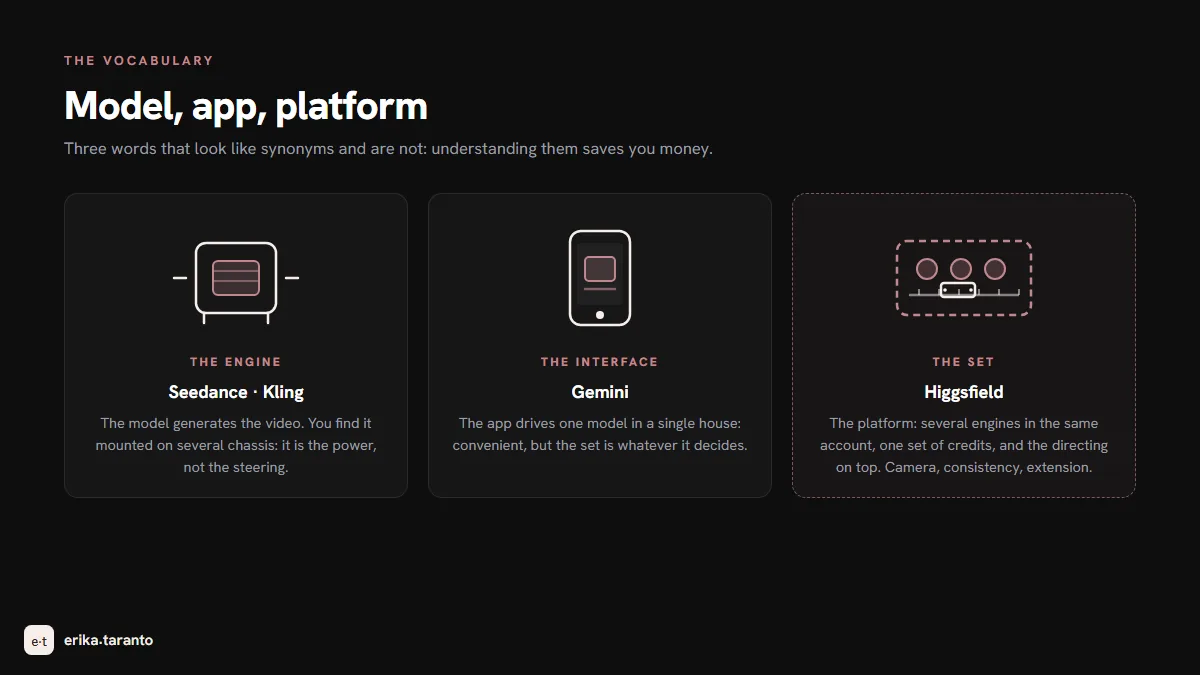
Let's start with confusion number one, because it costs money to people just starting out. Higgsfield is not an AI model: it is a platform. The model is the engine that generates the video: Seedance, Kling, Veo. The platform is the place where the engines work: it hosts them all in the same account, with the same interface and the same credits, and adds what the engine alone does not have, that is, the way a film set works: ready-made camera moves to apply, character consistency from one generation to the next, extension of a successful clip, editing of several shots into a single flow.
Behind it is a serious company, not a one-week experiment. It was founded by Alex Mashrabov, who previously built the computer vision of Snapchat's AI features: in August 2026 the company closed a $400 million round at a valuation of $5.4 billion. The number I care about is a different one, the one that does not make the news: the hours it saves. And that is why the platform won, in my daily work, over a subscription to a single model.
What is inside: models, directing and studio
The platform can be read on three levels, and that is the right way in.
The engines. For video, ByteDance's Seedance, today up to version 2.5 with native thirty-second clips, and Kling, the realist of the group. For images, Google's Nano Banana Pro and Nano Banana 2 (which I cover in detail in this post), GPT Image, Seedream, and the in-house Soul and Soul Cinema models, tuned for the cinematic look: I use them for key frames and they weigh little on the budget. The catalog changes constantly, and that is part of the value: when a new model comes out, you find it at home without another subscription. I don't subscribe to everything: I use Kling inside Higgsfield, where I already have it.
The directing. It is the level that made me stay. Ready-made camera moves, from dolly to orbit to push-in, applied with a click instead of described in words and hoped for. Character consistency, which keeps the same face from one clip to the next starting from the references. Clip extension, to lengthen a successful generation instead of redoing it. And multi-shot, which splits a long scene into shots that are consistent with each other.
The studio. Around the engines there is a small world for producers: Higgsfield Audio, with ready-made voices and the cloning of a voice from an audio sample of your own, the Shorts Studio that changes the style of a video of yours, up to two minutes long, with a preset of your choice from dozens, in 9:16 or 16:9, the Premiere Pro plugin, the prompt-based app builder. And since August the Blender plugin: you block the scene in 3D with camera and timing, export the reference without generating anything, and Seedance executes the movement to the letter. I covered it in the dedicated post, and it is the closest thing to real directing that AI video has today.
How to use Higgsfield: from first login to first clip
The first afternoon is only for understanding where things are. The path I would give to anyone starting today:
- Create the account and see what the free plan includes. The free plan includes no credits and gives access to a few models. Enough to get your bearings, not for a project, and that is fine: first you learn to write, then you pay to produce.
- Choose the engine based on the scene, not the hype. The scene with three actions in a row goes on Seedance; the person walking and gesturing goes on Kling; the keyframe that has to look like cinema goes on Soul Cinema. In the main guide you find the complete table of who wins where.
- Write the prompt with the five elements. Subject, action, camera, light, audio, in this order and in one sentence. English works better: the models are trained mostly on it. My prompts always start in English, even for videos I then publish in Italian.
- Apply the camera from the panel, not from the prompt. It is the gesture that separates those using the platform from those using the model: instead of writing "cinematic camera" and praying, you pick the move from the panel (orbit, dolly, push-in) and the prompt stays free to describe the scene.
- Generate, watch, regenerate. The first version is almost never the good one, and it is not your fault: in my work I redo one clip in three. The advantage here is that every cost is written on the button before you press: you always know how much you are spending.
One last thing, said as a person, not as an ad: it is the site where I spend my days, and it works well for me. If it were not so, this post would not exist.
How credits work (the part nobody explains)
Credits are the one currency for everything: one budget consumed by images, videos, 3D. Every engine has its price per generation, so the same pack can become many images or a few clips, depending on what you make it do: an image weighs much less than a clip, and a clip in higher resolution weighs more than one in standard resolution. Costs move, so always look at the button in the app before you confirm.
Two rules you need to know before you commit to your first paid plan:
- Plan credits do not accumulate. They reset to zero at the end of the monthly cycle: it is a "use them or lose them" model, so the right plan is the one you actually use up, not the biggest.
- Extra top-ups expire. Top-ups have an expiry date: they are for a project with a fixed end, not as a reserve.

How much Higgsfield costs: the plans
The structure scales with volume: the more you pay, the more credits per month, the lower the cost per credit, the more parallel generations, and on the high plans some models switch to unlimited use. To produce regularly you need a paid plan. Prices, credits and quotas change often: for today's, check the official page.
| Plan | Who it is for | What changes |
|---|---|---|
| Free | To get your bearings | No credits included, a few models, a watermark on generations |
| Starter | To get started | The first paid step |
| Plus | To produce regularly, on a small scale | Reels and clips for social, with a few unlimited-use windows |
| Ultra | To produce a lot | More credits, some models in unlimited use, more parallel generations |
| Team | For several people | Shared seats and centralized management (for larger teams there is the Scale plan) |
The annual plan costs less than the monthly one: if you know you will be working on the platform all year, it pays off, but it is not a decision that changes the bill. There are also time-limited windows, the promos that open unlimited use on one model for a week: I always look at them the way I look at low-cost flights, because the window is only worth it if your project fits inside.
The workflow I use every day
I will spare you the theory: this is the complete run of one of my projects, from the first image to the edited video.
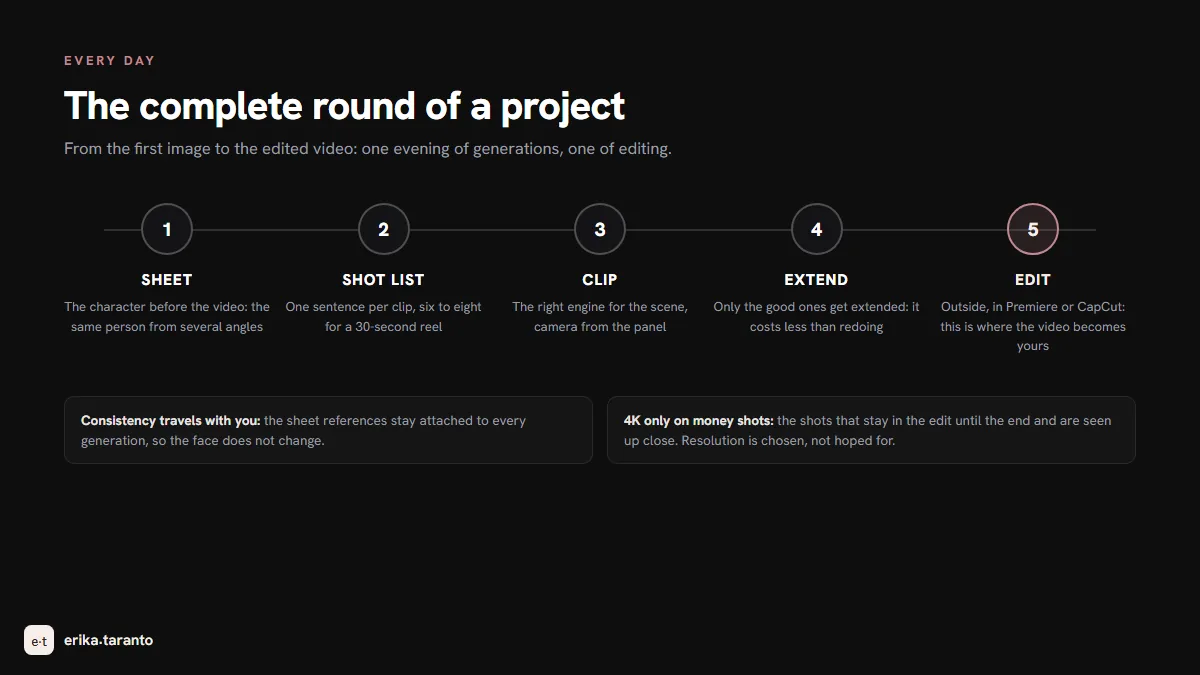
- I build the character before the video. I generate the character sheet: the same person from far away, up close, from the side, three quarters. With the in-house image models, Soul Cinema included, it weighs little on the budget.
- I decide the shot list, one sentence per clip. Six to eight sentences for a thirty-second reel. Every sentence is a shot, with its declared camera.
- I generate the clips with the right engine for the scene, with character consistency attached to the sheet references. The camera is chosen from the panel, not from the prompt.
- I extend only the successful clips. If a clip is good and needs to be longer, I extend it: it costs less than redoing it from scratch and the edit stays identical.
- I edit outside the platform. The platform generates, the editing I do in Premiere (or CapCut for quick reels): cuts, voice, subtitles, end card. No platform gives you the editing, and that is how it should be: it is where the video becomes yours.
One evening of generations and one of editing: with this process I have brought short films to competitions and built reels for clients. If you want to see where the method arrives, the UNSEEN case study shows the complete film, behind the scenes included.
The limits, told honestly
I use Higgsfield every day and I recommend it, so I owe you the real cons, not the facade ones.
- Credits expire. It is the point that stings the most: you finish the cycle and start from zero. If you produce in waves, one full month and one empty, you feel it. Countermeasure: size the plan for the full month.
- The learning curve is directing, not software. The interface is learned in an afternoon; what takes weeks is deciding the shots. The platform does not make you a director, it gives you the set.
- The interface is not available in Italian. It comes in English and a few other languages, including German, Spanish, Japanese, Korean and Chinese. No drama, but if English holds you back, know it beforehand: prompts also work better in English.
- Unlimited use goes through a queue. Unlimited generations run in the standard queue and with few generations in parallel, while credit-based ones go through the priority queue. If you have an intense production evening, better to spread it out.
- Names and prices change often. Renamed plans, added models, window promos. It is the price of a platform that moves fast: everything you read here needs rechecking on the official page.
Who it is for (and who it is not for)
I will tell you straight, because it is the biggest saving I can give you.
It is for you if: you produce videos every week, for clients or for your own channels; you move across several engines because scenes ask for different things; you have a character that must stay the same; the time you lose regenerating is worth more than the credits.
It is not for you if: you need one clip a month. In that case the free daily credits of Google Flow or Dreamina, or Gemini for images, cost you patience and not money: the complete free routes are in the free AI video generators guide. And if you do not yet know which scenes you want to shoot, first the main guide, then the tool.
And if you need the video for your brand and prefer to have someone who does it every day: that is my craft. Write to me and we start from an idea.
The guides of the video path
- Create videos with AI, the map of all the tools (the pillar of this guide);
- Higgsfield enters Blender, the plugin that brings 3D directing into the workflow;
- Seedance, the engine I use most inside the platform;
- Kling AI, the realist;
- Sora 2, the storyboard pioneer, which closed in 2026;
- Free AI video generators, all the ways at zero cost.
If you arrive from the world of images, the same road is already mapped out: start from creating AI images for free.
Sources
- Higgsfield, prices and plans: higgsfield.ai
- Official Higgsfield blog, plans and prices (post of September 15, 2026): higgsfield.ai
- Higgsfield, August 2026 round and annualized revenue (official post): higgsfield.ai
- ByteDance Seed, Seedance 2.5: seed.bytedance.com
- Alex Mashrabov, founder: linkedin.com
- Credit behavior and plan structure: verified on the official Higgsfield pages (August and October 2026), and on the Blender plugin post in August 2026
For updates and news, there is my Telegram channel
I publish the latest news on AI video tools there first.

Leave a comment
Comments are reviewed and approved before they appear.