
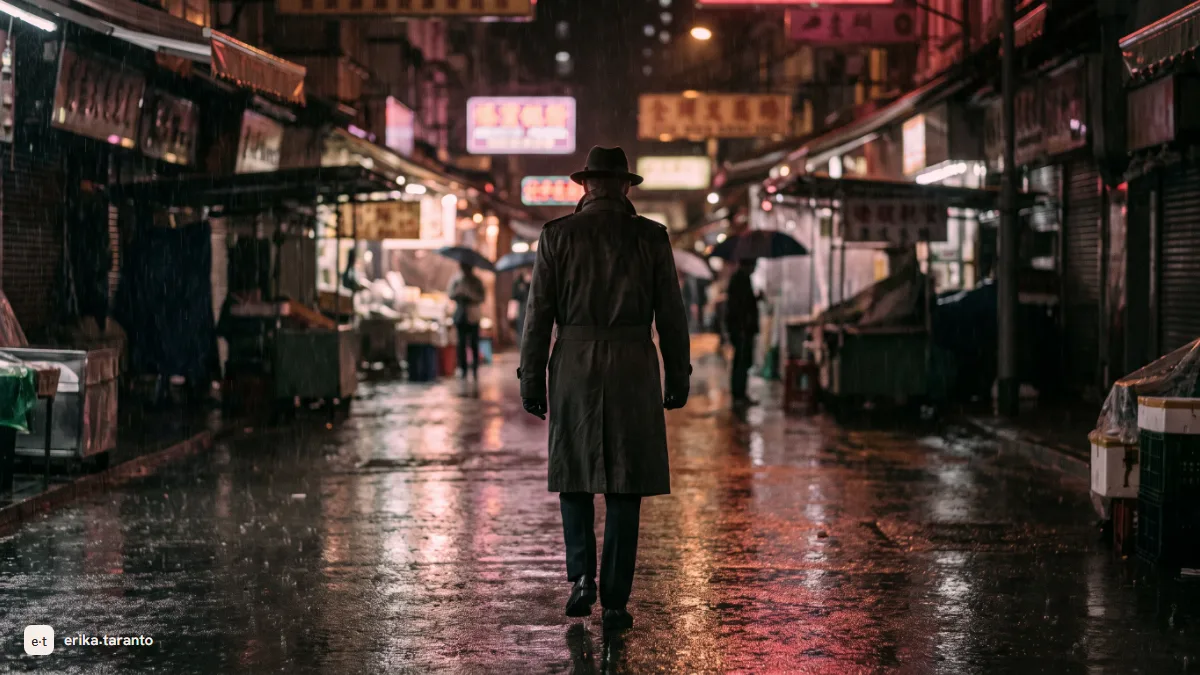
Veo 3 is the video generation model of Google DeepMind, presented in May 2025: you describe the scene and it generates a clip of up to eight seconds with synchronized audio inside, dialogues included. You use it in Flow (Google's tool dedicated to AI video) and through the APIs; in the Gemini app, video requires a paid Google AI plan, and since May 2026 Gemini Omni sits there in place of Veo. Of the five big engines, it is the one that follows the prompt most precisely: you ask for a sideways tracking shot with backlit rain and you get that scene, not a cousin of it. Here you will find how to start, what it really costs, the differences between Veo 2, 3 and 3.1 and the limits nobody writes about.
In my weekly work, Veo 3 clips are the shots that come out right on the first take most often. Not because it is magic: because it is the engine most faithful to the sentence you write. The others give you beautiful variants of the scene you asked for; Veo tends to give you the scene you asked for. If you make videos for clients, where the brief is non-negotiable, this difference is everything.
This guide zooms in on Veo 3: the complete map of the five engines, including who wins where, is in the main guide create videos with AI.
The other models give you a scene similar to the one you asked for. Veo gives you that scene: it is the reason it ends up in my projects when the brief is written.
What Veo 3 is (and where it comes from)
Veo 3 is a text-to-video model by Google DeepMind: you give it a description, or a starting image, and it returns a clip of up to eight seconds with camera, movement and audio generated together. The audio is the turning point that set it apart from the previous generation: rain that sounds like rain, footsteps that match the pace, characters whose lips match their speech.
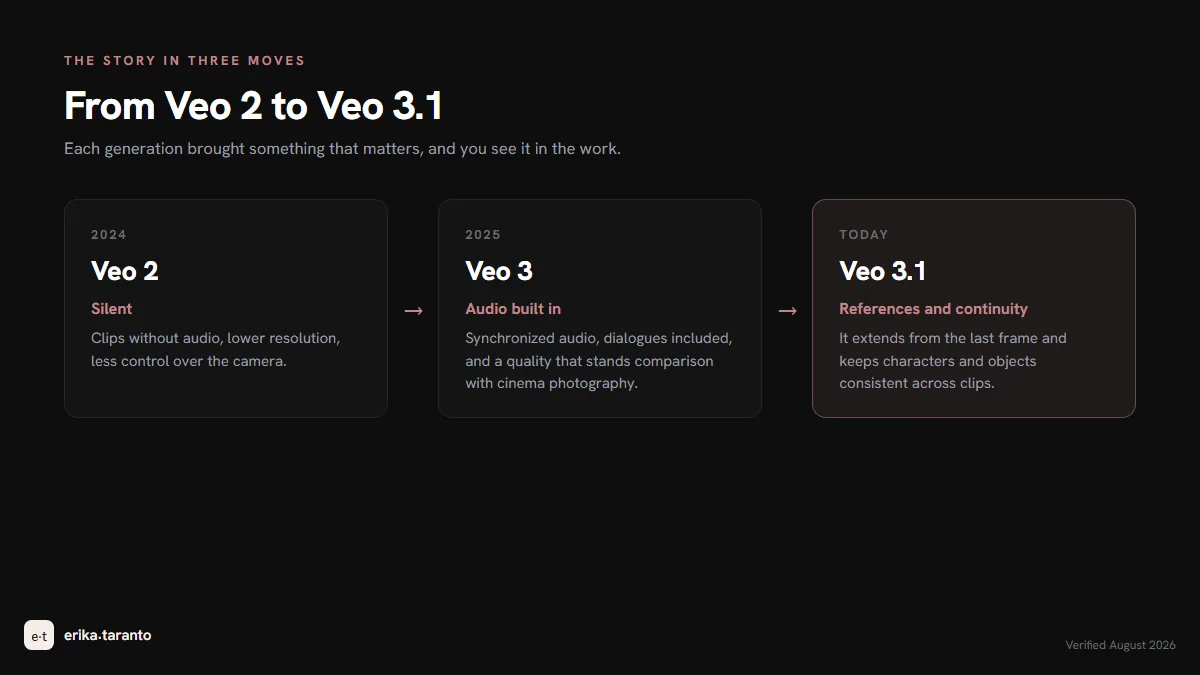
The story in three steps helps you get your bearings, because you can still find all sorts of things about Veo online and it gets confusing:
- Veo 2 is the previous generation: clips without audio, lower resolution, less camera control. You can still find it mentioned as a "fast" option, but it is no longer in the Gemini APIs: it was fine for trying, but producing is a different matter.
- Veo 3, presented in May 2025, brought synchronized audio and a quality that holds up next to film cinematography. It is the moment AI video stopped being mute.
- Veo 3.1, the latest version, added continuity: the possibility of starting again from the last frame to extend the scene, and references to keep the same character and the same objects across different clips.
When someone searches "Veo 2" today, they almost always want to know whether the jump to 3 is worth it: it is, and audio is the number one reason.
Veo 3 for free: where you really try it
The question I get most often is whether Veo 3 can be used for free. Yes, with precise limits:
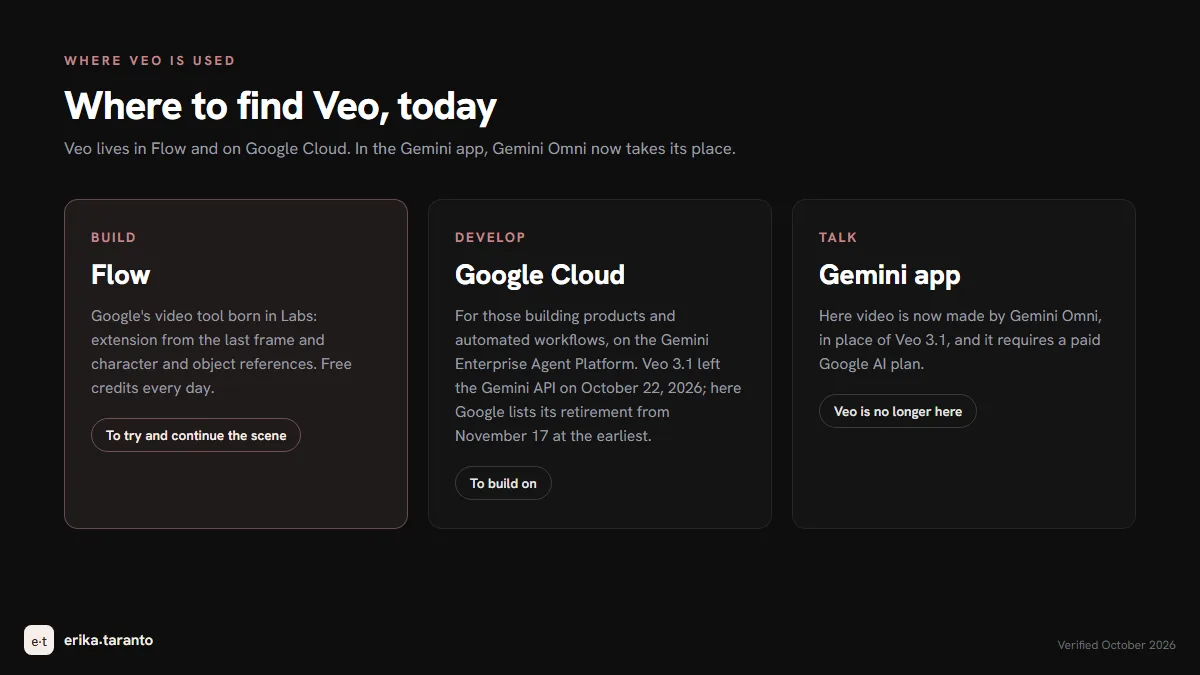
- Inside Gemini: no longer free. In the app, video requires a paid Google AI plan, and today Gemini Omni works there instead of Veo. The free part has moved elsewhere: to understand whether the tool is for you, the daily credits in Flow are enough.
- Inside Flow: Google's video tool born in Labs gives free credits every day, which run out fast, especially with the higher-quality models. Flow is great for building scenes, not for producing for free.
- All the serious free routes, together, are in the dedicated guide: free AI video generators, where Veo is one entry in the complete picture.
My honest take from production: Veo's free tier is for learning to write prompts, not for doing work. If you have a project with a deadline, the daily limits stop you halfway, and stopping halfway is the worst way to get to know a tool.
How to use it: the first clip in five steps
The path I would give to anyone starting today, starting from Flow's free credits:
- Open Flow, pick a Veo model and ask for a video in natural language: "generate a video of...". No commands needed: Veo reads the sentence.
- Write the scene with the five elements: subject, action, camera, light, audio, in this order and in one sentence. Below I leave you an example I really use.
- Watch what comes out and iterate on the wrong part. The camera wanders? Specify it again. The light is flat? Name the light source. Do not regenerate blind: every attempt has a cost, even when it is free, because time is the first budget.
- When the clip holds, extend it if the scene needs continuing: in Flow you can start again from the last frame and keep the ingredients, meaning the character and object references that make subsequent clips consistent.
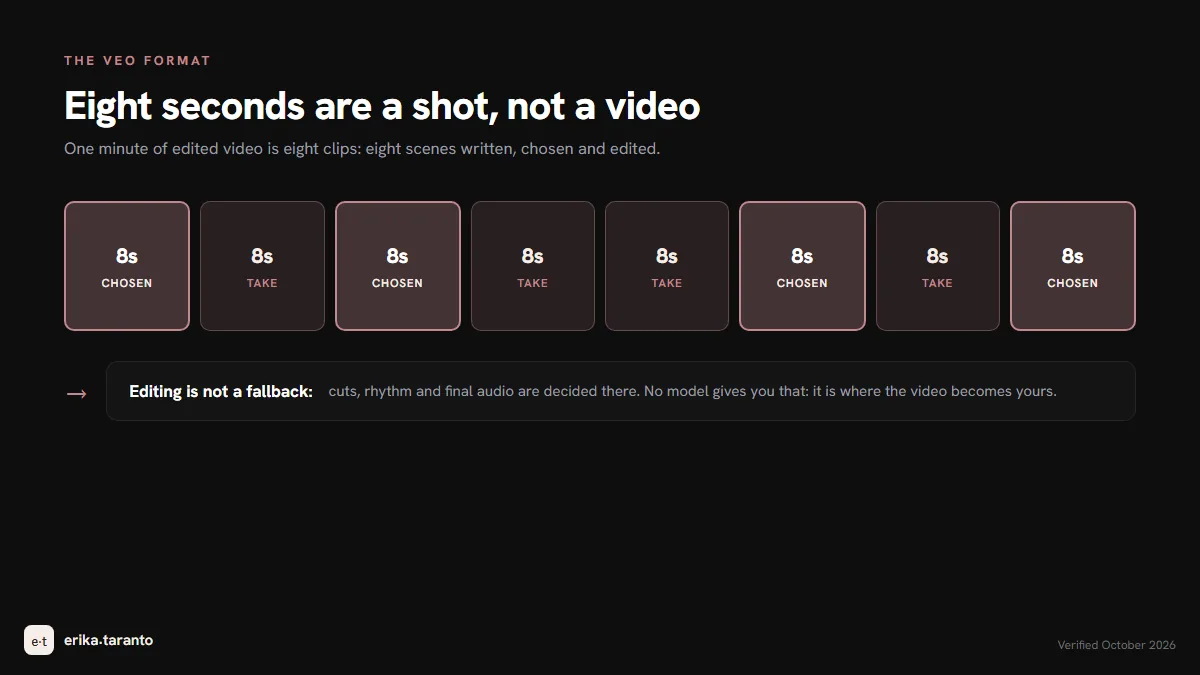
- Edit outside the tool. Eight seconds is a shot, not a video: cuts, rhythm and final audio are decided in editing. No model gives you that.
The prompt on Veo: five pieces, one sentence
On Veo, careful writing pays off more than elsewhere, because the model does what you write. The structure I use, with an example that works for a first try:
A woman in a beige trench coat walks alone through a night market, camera tracks laterally at walking pace, warm string lights and steam from food stalls, ambient chatter and her footsteps.
Subject (who is in it), action (just one), camera (spelled out), light (name the source), audio (the sound you want). Veo takes every piece seriously: if you state the camera, the camera does that; if you name the light, the light arrives from there. The complete rules, including traps like "no people in the background", which makes people appear in the background, are in the prompt section of the main guide.
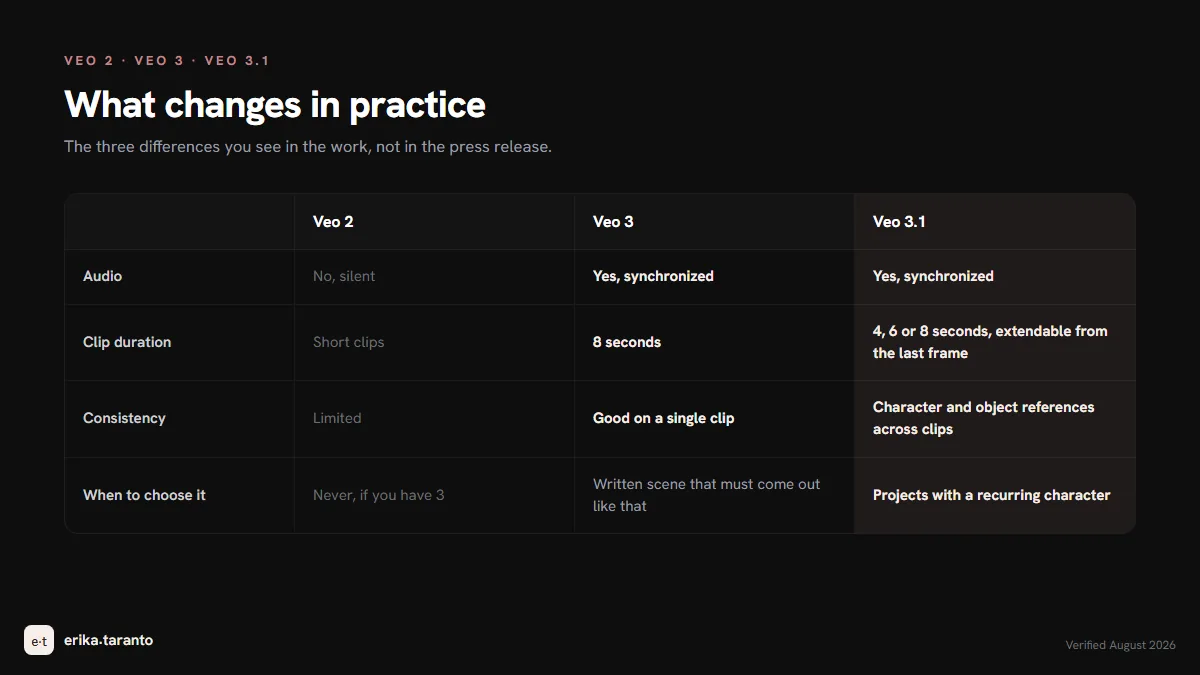
Veo 2, Veo 3, Veo 3.1: what changes in practice
| Veo 2 | Veo 3 | Veo 3.1 | |
|---|---|---|---|
| Audio | no, mute | yes, synchronized, dialogues included | yes, improved |
| Clip duration | short clips | 8 seconds | 4, 6 or 8 seconds, extendable from the last frame |
| Consistency | limited | good on the single clip | character and object references across clips |
| Where you find it | no longer in the Gemini APIs | superseded by 3.1; its models are no longer in the Gemini APIs either | Flow and Gemini Enterprise Agent Platform (no longer in the Gemini APIs since October 22, 2026): it is the latest version of Veo |
| When to choose it | never, if you have 3 within reach | written scene that must come out like that | projects with a recurring character |
How much Veo 3 costs
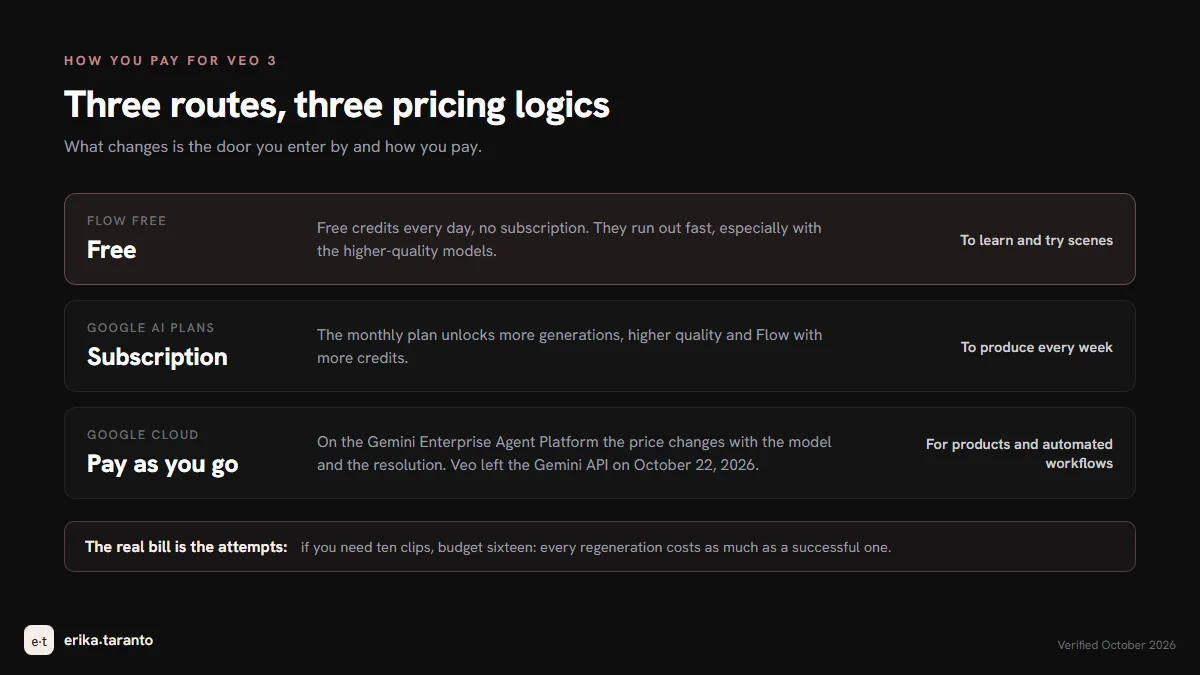
Three routes, three pricing logics. Prices, credits and quotas change often: for today's, check the official page.
| Route | What you pay | When it makes sense |
|---|---|---|
| Flow free | free: free credits every day, no subscription | Learning to write prompts, testing scenes |
| Google AI plans | the monthly subscription unlocks more generations, higher quality and Flow with more credits | Producing every week |
| API (Google Cloud) | pay as you go on the Gemini Enterprise Agent Platform: the price changes with the model and the resolution; since October 22, 2026 Veo is no longer in the Gemini API | Building products and automated workflows |
Where Veo stumbles (and how to get around it)
I use Veo every week and I recommend it, so I owe you the real cons:
- At most eight seconds per clip. It is the format of the shot, not of the video: you extend it in Flow or you edit. Anyone who comes in asking "make me a one-minute video" has to recalibrate their expectations: one minute is eight clips, meaning eight written scenes.
- The safety guardrails. Famous faces, real people, sensitive content: Veo filters hard. In work for brands it is almost always an advantage, but know it before writing the prompt with your ambassador inside.
- Text inside the video. Like every model: text comes out crooked. Text gets added in editing, always.
- Lip sync in Italian. English works well, Italian less so: for Italian dialogues the voice goes in post.
- The invisible watermark. Veo videos carry SynthID inside, Google's invisible signature declaring the AI origin. You cannot see it, it is designed to withstand cropping, filters and compression, and you can check it with Google's SynthID Detector tool or by asking Gemini: always declare where it comes from.
When I choose Veo, and when not
The way I split scenes between engines, Veo takes the shots where precision pays: the scene is already written, the client has approved the reference, it must come out like that. When the scene asks for something else, I change engine:
- people walking, gestures, body physics: Kling handles movement better;
- scenes with several actions in a row, long clips: Seedance remembers them all;
- whole projects with camera, consistency and extensions to manage together: I go through the directing platform, Higgsfield, where the engines sit alongside the tools around them.
And if you need the video for your brand and prefer to hand it to someone who does it every day: that is my craft. Write to me and we start from an idea.
The guides of the video path
- Create videos with AI, the map of all the tools (the pillar of this guide);
- Higgsfield, the directing platform where the engines work;
- Seedance, the engine for actions in a row;
- Kling AI, the realist;
- Sora 2, the storyboard pioneer, which closed in 2026;
- Free AI video generators, all the ways at zero cost.
Sources
- Google DeepMind, official model page: deepmind.google/models/veo
- Gemini, official page on video generation with Gemini Omni: gemini.google/overview/video-generation
- Flow, Google's video tool born in Labs: flow.google.com
- Gemini, announcement of Gemini Omni (Google I/O, May 2026): blog.google
- Gemini API, Veo documentation (duration, prompt languages, SynthID): ai.google.dev
- Gemini API, video generation (default model): ai.google.dev
- Flow, help center, credits: support.google.com/flow
- Google Cloud, Gemini Enterprise Agent Platform pricing (Veo): cloud.google.com
- Google Cloud, Veo 3.1 on the Gemini Enterprise Agent Platform (release and retirement dates): docs.cloud.google.com
- Gemini API, model retirement dates: ai.google.dev
- Google DeepMind, SynthID: deepmind.google/models/synthid
- Model behavior: verified in the app in August 2026, same check as the main guide
For updates and news, there is my Telegram channel
I publish the latest news on AI video tools there first.
Leave a comment
Comments are reviewed and approved before they appear.