
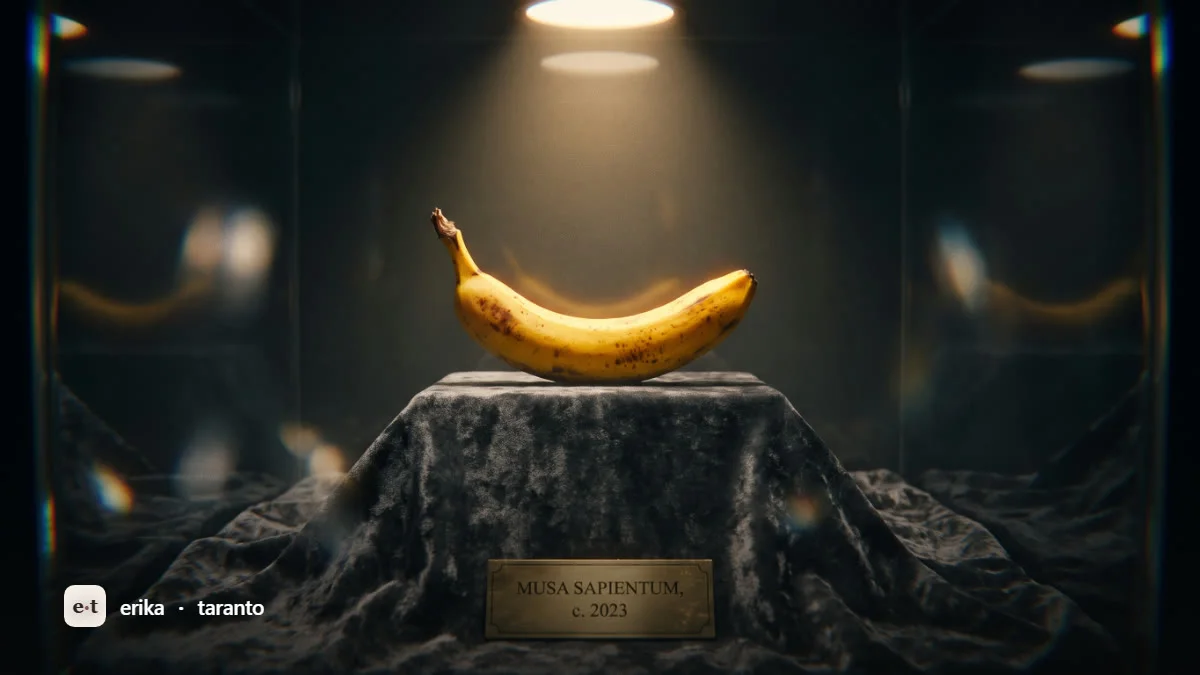
Nano Banana Pro (Gemini 3 Pro Image) is free in the Gemini app with strict limits: about 2 images per day, then it switches to the base model (variable, verified July 2026). On the official API it costs $0.134 per image up to 2K and $0.24 at 4K. There is no free tier on the API.
If you searched for “nano banana pro cost” you probably got lost in the fog of names. Nano Banana, Nano Banana Pro, Nano Banana 2, Gemini Image: they sound like different products but they are the same ecosystem, with very different prices. In this guide I explain what Nano Banana really is, which Gemini model runs under each name, how much you can use it for free and what it costs if you work with the API. The API prices below are Google’s official ones (ai.google.dev); I report the free plan limits as estimates verified in July 2026, because Google changes them all the time.
This article is part of my broader guide on creating AI images for free, where I compare seven tools. Here instead I go deep on Google’s own system.
What Nano Banana is (and why the name confuses everyone)
Nano Banana is not a separate product. It is the viral nickname, born in August 2025, that the community gave to the native image generation models of the Gemini family. When you read “Nano Banana” you are reading “the model that generates images inside Gemini”.
The confusion comes from the fact that within a few months Google released four variants, all colloquially called Nano Banana with a different suffix. Under the nickname there are official names (Gemini X Image) and technical model IDs that you need for the API. Anyone who does not know this map ends up comparing prices of different models as if they were the same one.
Here is the clean map, with model IDs and release dates verified against Google’s official sources.
Mapping popular name, model and model ID
| Popular name | Official model | Model ID | Release |
|---|---|---|---|
| Nano Banana (base, legacy) | Gemini 2.5 Flash Image | gemini-2.5-flash-image | August 26, 2025 |
| Nano Banana Pro | Gemini 3 Pro Image | gemini-3-pro-image | November 20, 2025 |
| Nano Banana 2 | Gemini 3.1 Flash Image | gemini-3.1-flash-image | February 26, 2026 (current default in the app) |
| Nano Banana 2 Lite | Gemini 3.1 Flash-Lite Image | gemini-3.1-flash-lite-image | February 26, 2026 |
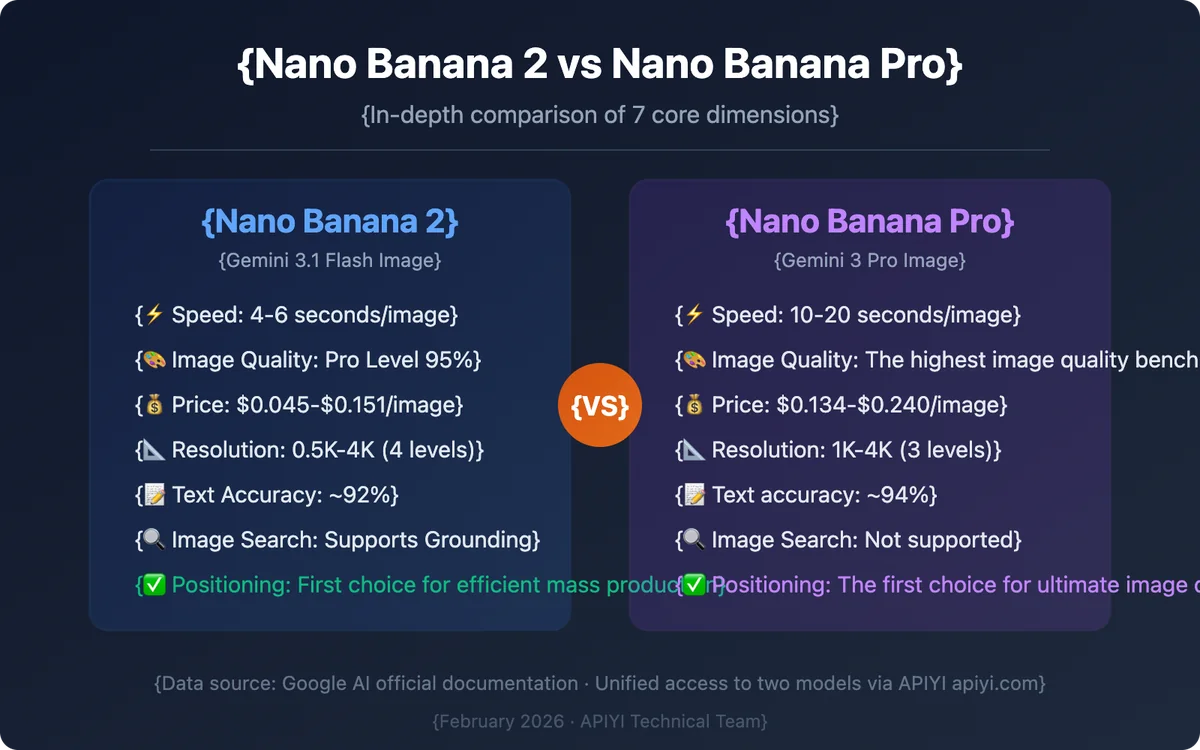
The detail that almost no article reports: since February 26, 2026 the default model in the Gemini app is Nano Banana 2 (Gemini 3.1 Flash Image), no longer the Pro nor the base version. Nano Banana 2 takes many of the Pro’s qualities (4K, text, consistency, grounding with Search) and brings them to the speed and cost of a Flash model. The Pro remains the high-end choice when you want maximum quality and reasoning.
What sets Nano Banana Pro apart (Gemini 3 Pro Image)
Nano Banana Pro is built on Gemini 3 Pro, so it inherits the reasoning and world knowledge of the language model. This changes the kind of images it can produce. It is not just “prettier”, it is smarter about what it draws. Here is what separates it from the rest.
World knowledge and Google Search grounding. The Pro can hook into real information through Google Search. This makes it strong on infographics, diagrams and content that requires correct, coherent data, not just aesthetics. When I generate an infographic with data or a concept map, the Pro gets things wrong far less than purely aesthetic generators.
Readable, multilingual text inside images. Text written inside images has been the Achilles’ heel of every generator for years. Nano Banana Pro makes it readable and correct, even in multiple languages. For logos, posters, covers and mockups with lettering it is a turning point.
Consistency for up to 5 people and 14 images. The Pro keeps up to 5 people consistent in the same scene and can fuse up to 14 input images. It means you can keep the same face (or the same product) across multiple generations without it changing at every prompt.
Resolution up to 4K. Native output up to 4K, useful for print, large formats and materials where detail matters.
Localized editing. You can edit precise portions of the image instead of regenerating everything: camera angle, focus point, color grading, lighting (including effects like day-to-night or bokeh) and aspect ratio. This is conversational editing: you say in words what to change and the model touches only that part.
SynthID always present. Every image carries SynthID, Google’s invisible watermark. On the free and Pro plans there is also a visible Gemini “sparkle”. On AI Studio and on the Ultra plan the visible watermark is removed, but the invisible one stays. I will come back to this because it matters for transparency.
How to use Nano Banana Pro: five paths
Nano Banana Pro does not live in a single place. Depending on what you need to do (a quick test, professional work, an automated integration) the right tool changes.
1. Gemini app (the simplest way)
Go to gemini.google.com/app, log in, open the Tools menu and choose “Create images”. From there you write the prompt, or upload a starting image for editing. Generation is conversational: you can say “make the background nighttime” or “change the jacket color” and the model edits only that spot. You need a Google account and access is restricted to adults. This is the free route, with the limits we will see in a moment.
2. Google AI Studio (no visible watermark)
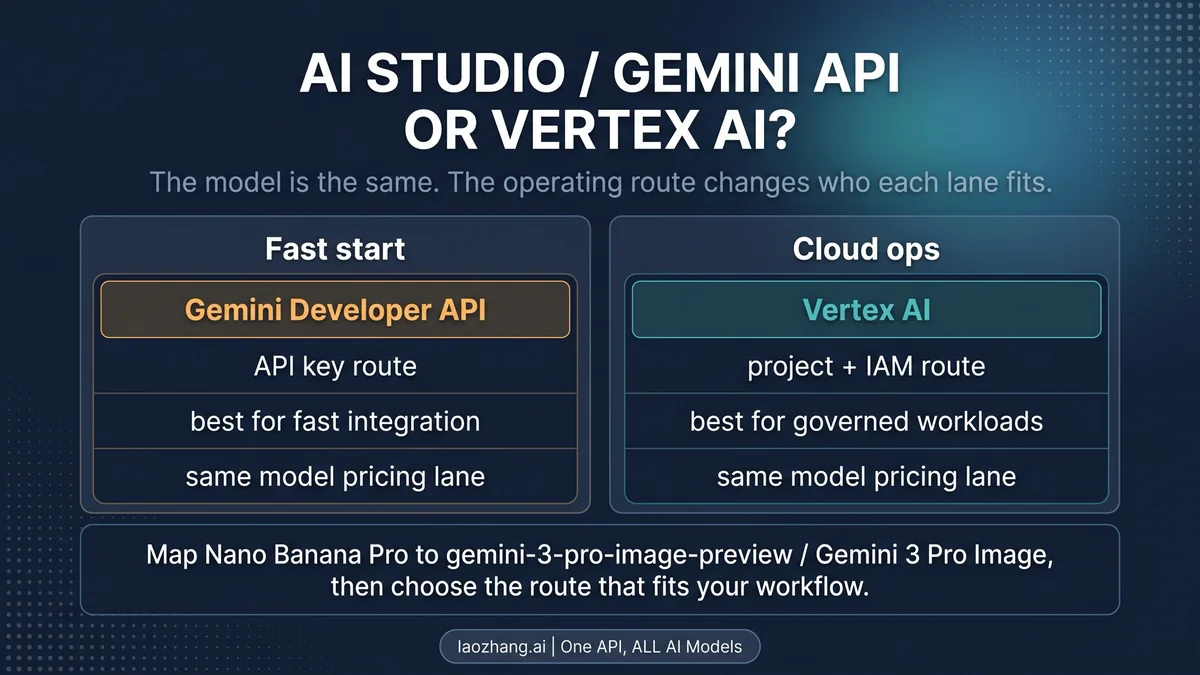
On aistudio.google.com you get access to the models in a more technical environment, designed for prototyping. The practical advantage: images generated here have no visible sparkle (the invisible SynthID stays anyway). It is useful when you want to evaluate the pure quality of the output.
3. Gemini API (for those who automate)
If you are building an app, a workflow or generating images in volume, you use the Gemini API (ai.google.dev). Here pricing is per token and per image, official and transparent. No free tier: you pay for what you generate. This is the path to look at if you are asking yourself “how much does it really cost me to produce 100 images”.
4. Vertex AI (businesses)
For enterprise contexts, with dedicated controls, quotas and security, there is Vertex AI on Google Cloud. Same model, corporate frame.
5. Integrations: from Photoshop to Google Ads
Nano Banana is integrated into a growing ecosystem: Google Ads, Slides, Vids, NotebookLM, Flow, the AI Mode of Search (in the United States for now) and, on the Adobe side, inside Photoshop and Firefly. If you already work in these tools, you often have the model one click away without opening the Gemini app.
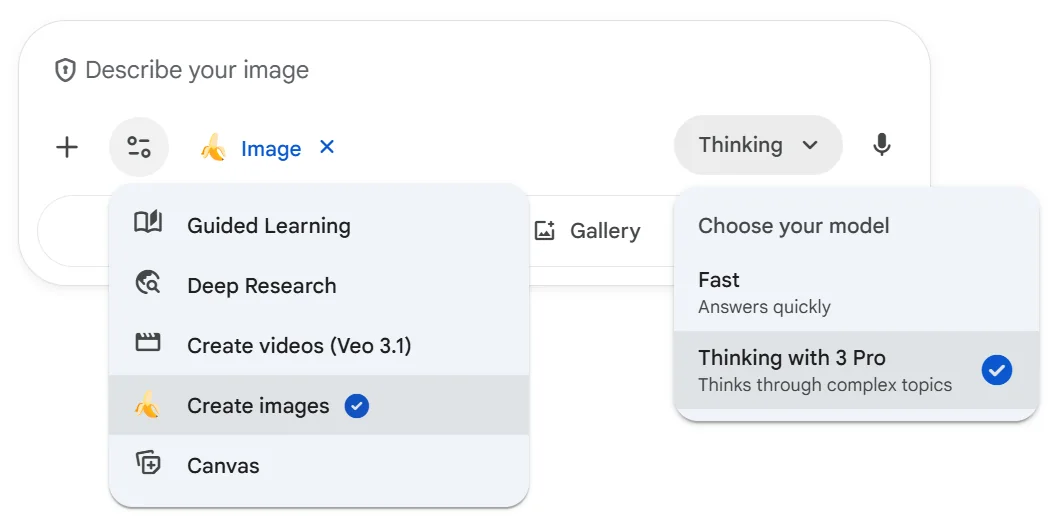
If you want the full step-by-step inside the app, I wrote it in the dedicated guide on how to use Gemini to create images: Nano Banana is exactly the model running behind that button.
Nano Banana Pro pricing: free, subscriptions and API
This is the heart of the question “nano banana pro cost”. There are three very different price levels and they must be kept separate, otherwise you end up comparing apples with bananas.
Level 1: free in the Gemini app (with limits)
On the free plan of the Gemini app you can use Nano Banana Pro, but with a low daily ceiling. The estimate verified in July 2026 is about 2 Pro generations per day (reduced from 3 to 2 toward the end of 2025 due to load), after which the system automatically falls back to the base Nano Banana model, which is cheaper and has looser limits. The reset happens at midnight UTC.
These numbers are variable and unofficial: Google does not publish a precise limit and adjusts it often. Take them as an order of magnitude (about 2 per day, verified July 2026), not as a guarantee. The base model, on the other hand, can be used much more freely and is the one you see by default with Nano Banana 2.
Level 2: consumer subscriptions (verify at purchase time)
Google offers paid plans that raise the limits. The figures circulating are third-party estimates, so I report them with caution and invite you to check them on one.google.com before paying:
- Google AI Pro: about 100 prompts per day (estimate), around $19.99 per month (third parties, to verify).
- Google AI Ultra: about 500 prompts per day (estimate), around $124.99 per month (third parties, to verify). The Ultra plan also removes the visible sparkle from images.
Do not take these figures as gospel: prices in euros and real limits change by country and over time. Always check the official page at the moment of purchase (variable, verified July 2026).
Level 3: official API (certain prices, per image)
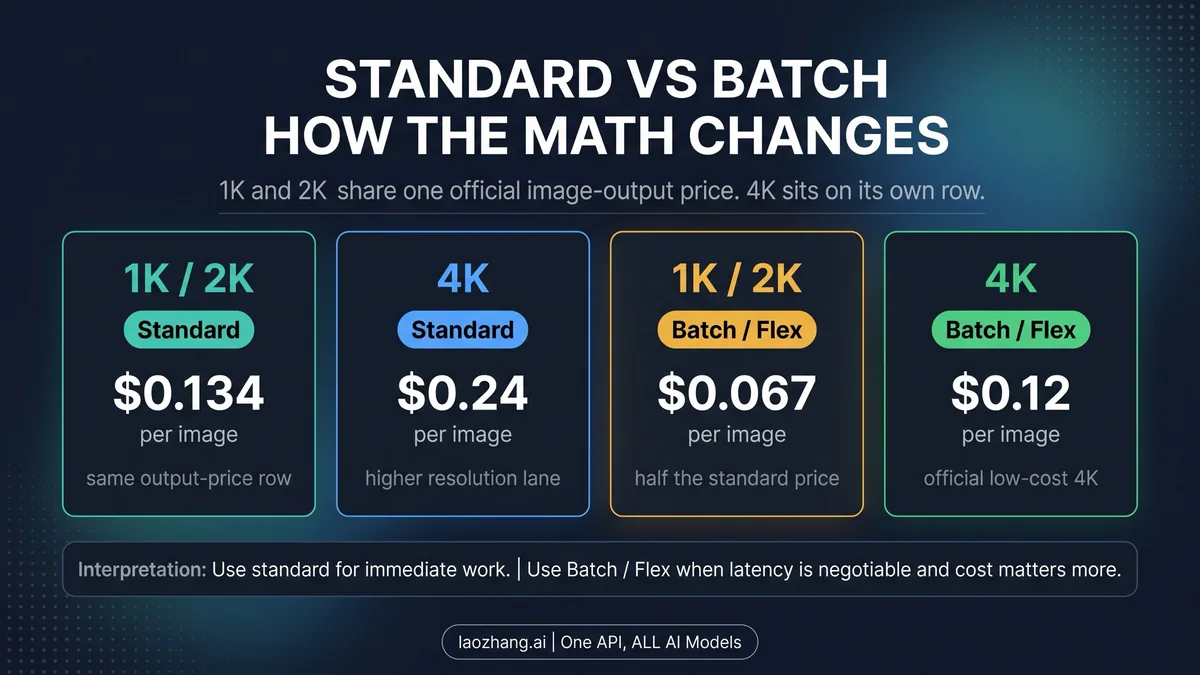
This is the solid part. API prices are published by Google at ai.google.dev/gemini-api/docs/pricing and are per token: input $2 per million, text output $12 per million, image output $120 per million tokens. Translated into cost per image (which is what you really care about):
| Model | 1K / 2K | 4K |
|---|---|---|
| Nano Banana Pro (Gemini 3 Pro Image) | $0.134/image | $0.24/image |
| Nano Banana 2 (Gemini 3.1 Flash Image) | $0.067 (1K) / $0.101 (2K) | $0.151/image |
| Nano Banana base (Gemini 2.5 Flash Image) | $0.039/image | not available |
Two notes that save money: batch mode (asynchronous processing within 24 hours) costs half, and some resellers such as Kie.ai or Fal.ai sometimes offer lower prices, especially on 4K. The API has no free tier: free only lives in the app.
What I really spend: cost examples for 100 images
Per-token prices are abstract. Let’s see what they mean in practice, with the most common example: generating 100 images. These calculations use only the official API prices from the table above.
- 100 images at 1K/2K with Nano Banana Pro: 100 x 0.134 = $13.40.
- 100 images at 4K with Nano Banana Pro: 100 x 0.24 = $24.00.
- 100 images at 4K with Nano Banana 2: 100 x 0.151 = $15.10.
- 100 images at 1K with Nano Banana 2: 100 x 0.067 = $6.70.
- 100 images at 1K with Nano Banana base: 100 x 0.039 = $3.90.
The practical reading: if you need the maximum (4K, perfect text, consistency) the Pro costs $24 per 100 images. If you are fine with an excellent 4K at half the price, Nano Banana 2 brings you to $15.10. For large volumes at low resolution, the base model at $3.90 per 100 images is unbeatable. And remember: with batch you halve everything, so 100 Pro images in 4K can drop to $12 if you can wait up to 24 hours.
For occasional, non-professional use, before opening an API account ask yourself whether the roughly 2 free Pro generations per day in the app are enough for you. For a private user the answer is often yes.
Use cases: when the Pro is worth it
You do not always need the most expensive model. Here is where Nano Banana Pro really makes a difference compared to the base model or Nano Banana 2:
- Infographics and diagrams with data: here the Pro’s world knowledge and Search grounding reduce errors.
- Logos, posters and covers with text: readable text rendering is its best weapon.
- Product mockups and packaging: 4K plus consistency let you keep the same product across multiple angles.
- Storyboards and consistent series: up to 5 consistent people means keeping the same characters across scenes.
- Fashion and professional portraits: localized editing of light, color and focus without regenerating the entire image.
For quick drafts, style tests or low-resolution social content, Nano Banana 2 or the base model are enough and cost less. I pull out the Pro when the result has to survive print or contain correct text and data.
SynthID: how to recognize an AI-made image
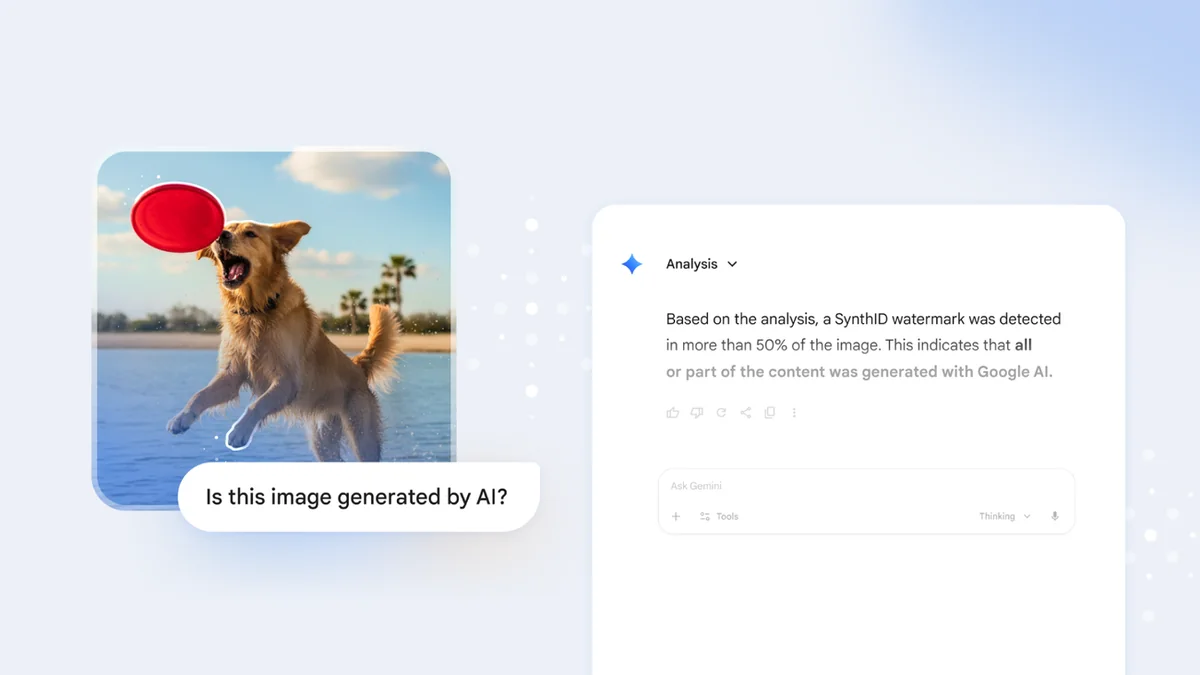
A point that almost nobody covers, but one I care about a lot as a matter of transparency. Every image generated by the Nano Banana models carries SynthID, an invisible watermark developed by Google DeepMind that survives cropping, compression and small edits. On the free and Pro plans there is also a visible sparkle in a corner. On AI Studio and on the Ultra plan the visible sparkle is removed, but the invisible one stays imprinted anyway.
Why it matters: if you receive an image and want to know whether it was generated by Google’s AI, you can upload it to the Gemini app and ask whether it contains SynthID. Google is extending detection to other tools as well. For those who create content professionally it is an honest way to declare what is real and what is generated, and it keeps you out of trouble when you publish.
Nano Banana and Imagen: two different Google systems
A small but important clarification, because it creates confusion. Nano Banana (inside Gemini) and Imagen are two different things. Imagen is Google DeepMind’s dedicated text-to-image model, while Nano Banana is the native image generation inside the multimodal Gemini model. As of mid 2026 Google is converging everything on Nano Banana and retiring Imagen (Imagen 4 shuts down on the Gemini API on August 17, 2026). If you want the full picture, I explained it in the article on Google’s Imagen, the other Google system, now on its way out.
In short
Nano Banana Pro is the spearhead of Google’s image generation: 4K, readable text, consistency and world knowledge. In the app you can try it for free (about 2 Pro images per day), but if you work in volume the serious path is the API, where you pay $0.134 per image up to 2K and $0.24 at 4K, with Nano Banana 2 as the cheaper alternative and batch at half price. Always keep the name mapping in mind: the default in the app today is Nano Banana 2, the Pro is the premium choice.
Want images like this for your brand?
Want to learn how to use these tools for your brand, without wasting credits and without publishing images you cannot use? I work with them every day, from brand imagery to AI commercials. Discover my services or write to me here and we will integrate them into your real workflow.

Leave a comment
Comments are reviewed and approved before they appear.