
Skip to content
Case studies
Case study · Step by step

How I remade a trend with my AI influencers

A reel trend with a street stall and a dance in front of the shop. I remade it with my AI influencers in place of the people, with a logo I chose and a different product: sushi instead of bread. Here you'll find the process step by step, the prompts and the mistakes I had to fix.

7 steps · 6 prompts · Higgsfield

The project in numbers and the tools

Everything you need to recreate it, frame by frame.

Steps
7
Prompts
6
Main toolHiggsfield
1

Level: Advanced · Updated October 2026

The Higgsfield symbol, a looping thread, made of a glowing strip of cinema film: in the frames a man in a top hat, a restaurant by the sea and a sunset, on a dark purple background
The main tool · Characters, location and video

Higgsfield

Genjutsu for the motion.

Affiliate link: if you sign up from here I receive a commission and you can get a discount of up to 50%, active for 3 hours from when you log in through the link (terms set by Higgsfield, they may change). I use Higgsfield every day and I would recommend it anyway.

Open Higgsfield
In practice

What to know before you recreate it.

What you need

A Higgsfield subscription with credits, a reference video from 4 to 30 seconds and three or four images (characters and location). To join the parts you need editing: today, for simple things, a paid Claude or GPT can do an excellent editing job, but for more control I recommend editing software. Any computer will do: the generation happens online.

What you can change

Genjutsu changes the visual side and leaves the video as it is: motion, camera and timing stay those of the reference. So you can change the look of objects, buildings, backgrounds, settings and characters, however you like.

Free alternative

To generate the characters and the location you can try the free quota of an image generator. To bring the motion of a video onto your characters there's Wan 2.2 Animate, an open source model (Apache 2.0 license) that runs in ComfyUI: it's free, but you need a powerful graphics card, or a few free trials on ComfyUI's cloud. I use ComfyUI for other work, but I haven't tried Wan 2.2 Animate on this trend. The results are different from those of Genjutsu.

The process

The video, taken apart frame by frame.

Each frame is a step: what I do, with which tool, and the real prompt, ready to copy.

Scroll: one frame after another.Scroll: the film strip moves with you. Or use the markers below.
Skip the process

Step 01: The trend and the reference video

On paper or with an AI

I pick the trend and note what happens and where the cuts fall: the reference video decides motion, camera and rhythm.

Read the step

The trend is the one from reels where you walk down the street, stop at a stall, bite into something and then dance in front of the shop, with fast cuts to the beat of the music. Genjutsu doesn't invent people: it transforms whoever is in the reference video. If there are three people in the video, there are three characters in the result.

Before generating I watch the video carefully and write down who does what, the gestures and where the cuts fall: in the image of this step you can see my shot list. Genjutsu accepts references from 4 to 30 seconds: mine was longer, so I split it in two parts at the cuts, one of about 20 seconds and one of about 14.

You can do it in two ways. By hand: you watch the video and write the shot list and the prompt yourself, it takes about ten minutes. With a very powerful paid AI (for example GPT-6 Astra or Claude Opus 5.5): you give it the video, ask it to write the shot list and the prompt, and in a few seconds you have a draft. The request I would make is in the prompt box: simple, the way I would write it to a person. I usually tell it which character in the video must be replaced by which of the images I attach; you do the same with objects, landscapes and everything else. Always check the draft: with a less powerful AI the shot list comes out wrong and you only notice after you've generated.

Some AIs can't see videos: in that case have it extract the frames itself, one every half second, with a free program like ffmpeg. The motion of this video comes from a reel I found on social media, and I'm not showing it here: the shot list is made from the frames of my result. For your own work the safest route is to shoot your own reference: a few minutes with your phone, for a few seconds of video. With the phone it's best to do several takes and keep the good one: that's the one you then bring into Genjutsu to make the video with your AI influencers.
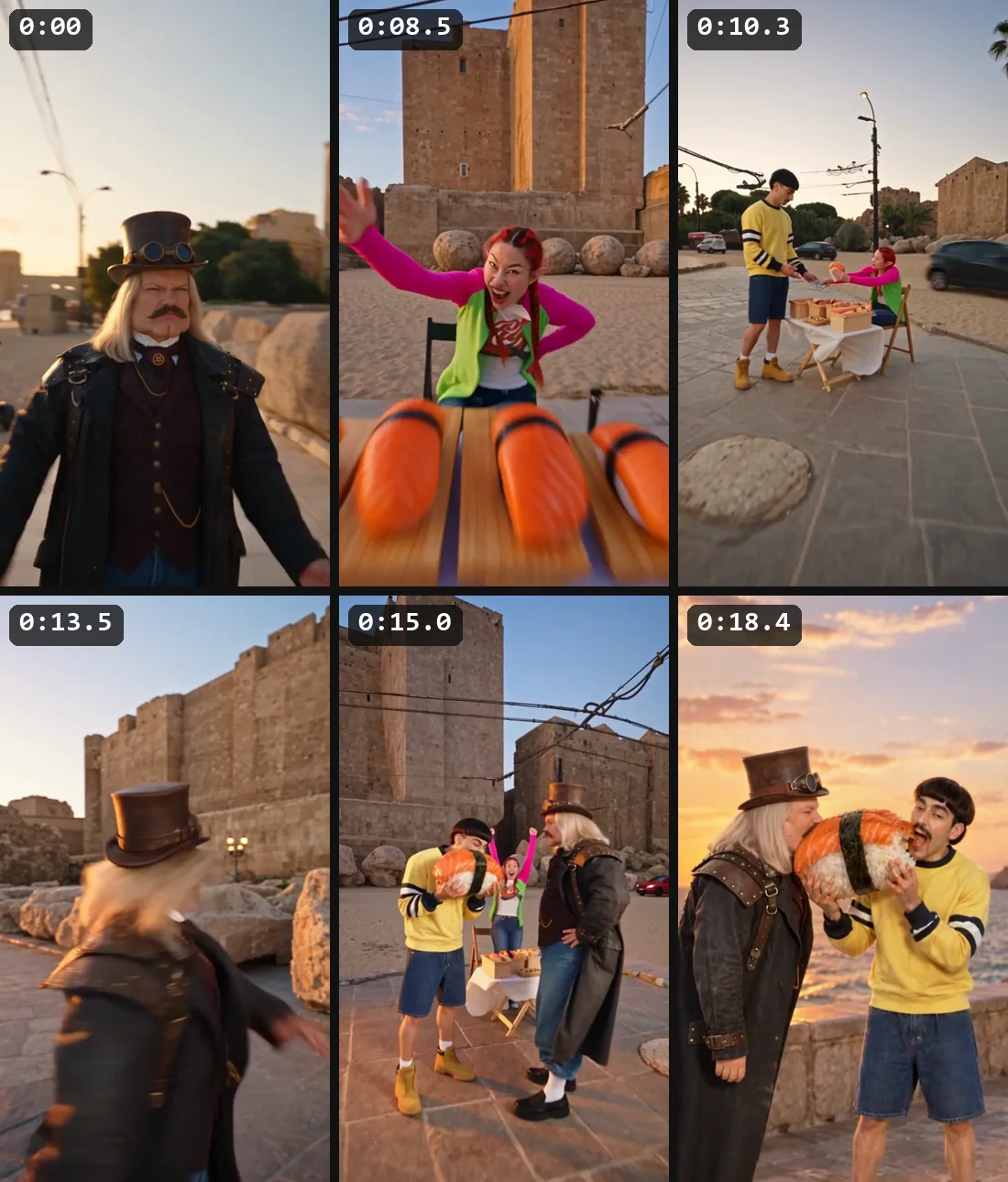
Six frames of the finished video, one per shot, with the second where each cut begins
The shot list: six of the trend's cuts, with the second each one starts
The request to send to the AI (I write it in Italian; translated here) · Text
I'm attaching a reel (@video 1) and four images: the sheets of three characters (@image 1, @image 2 and @image 3) and the location (@image 4). I want to remake the reel with Higgsfield Genjutsu, with my characters in my location and with a different product: sushi instead of bread. Replace the woman in the black top with @image 1, the woman in the headscarf with @image 2 and the man in the white t-shirt with @image 3. List the cuts with the second each one falls on and write me the prompt for Genjutsu, in English.

TipWrite down the cuts with their time: you need them to edit the pieces back together at the same rhythm.

Step 02: The characters: one sheet per person

Character sheet

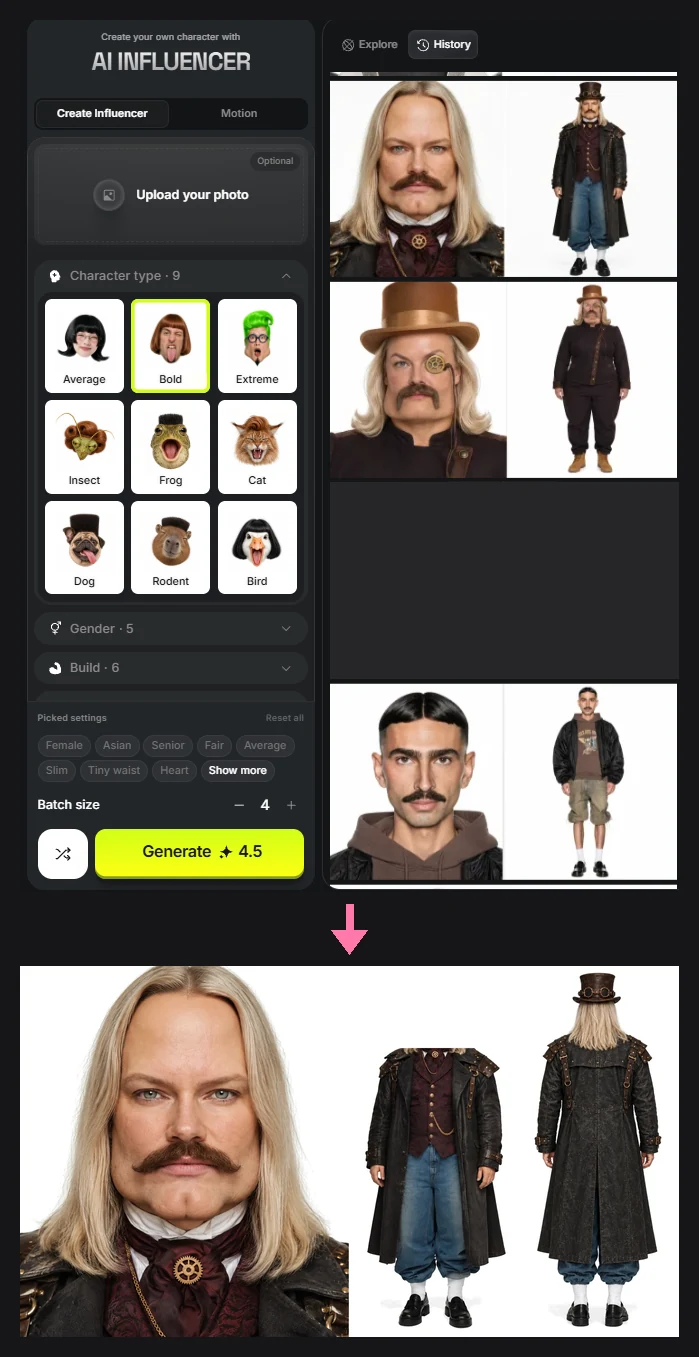
For each character I make a character sheet: a single image with the close-up face, the full figure from the front and the full figure from behind. From the front figure I remove the head.

Read the step

An AI influencer isn't born from a single prompt: it starts with casting. For this video I have three characters: a man with a top hat and steampunk goggles, a woman with elf ears and red braids, a man with a bob haircut and a mustache. Each one has their own sheet and each sheet shows ONE person only.

The character sheet is a single image with three views of the same person: the close-up face, the full figure from the front and the full figure from behind, with flat light and a neutral background. I make it with whichever tool works best for me: GPT Image, Seedream or Higgsfield's AI Influencer, which you can see in the top part of the screenshot.

AI Influencer starts from a character type and its traits (gender, build, age, hair, eyes, mustache...) and gives the close-up face and the full figure from the front. I add the view from behind with an edit: I upload the sheet as a reference in GPT Image 2.5 and ask for the same character seen from behind. The prompt is in the prompt box.

At the end, in the sheet, I remove the head from the full figure in front, cutting just below the chin.

At the top, Higgsfield's AI Influencer tool with the sheets already generated; at the bottom, the final sheet of the steampunk man: the close-up face, the full figure from the front without the head and the full figure from behind
At the top the AI Influencer tool, at the bottom the final character sheet with the three views
Edit prompt for the view from behind · Image
A plain film character sheet photograph of the same adult man as in the reference, now seen from directly behind, full body, standing straight with his arms relaxed at his sides and both feet flat on the ground, the whole body from the top of the hat to the shoes in frame and centered. Same long straight blond hair falling past his shoulders, same brown leather top hat with brass goggles on the band, same long black weathered leather coat with studded leather shoulder pads and buckled straps, same blue baggy trousers gathered above the ankles, white socks and black loafers. Flat soft studio light, plain white seamless background, no styling, unretouched natural photographic look, the same scale and proportions as the full-body figure in the reference.
  • ToolAI Influencer
  • EditGPT Image 2.5, with the sheet as a reference
  • Format2:3
  • QualityHigh

TipRemove the head from the full figure in front: in my experience the character keeps its identity better, because the model sees only one face, the close-up.

Step 03: The location, chosen first

Higgsfield · Image

The location is an image: Genjutsu rebuilds the street of the reference video around that exact place.

Read the step

Before the video I choose where it takes place. Here it's a seafront at sunset with a sushi restaurant and my sign, erikataranto.com. The location is the fourth reference image, after the three characters.

For locations I use GPT Image 2.5: for what I need and by my standards it's very good. The prompt was only a test: one short, simple sentence in Italian, to try the tool. The image came out nice anyway, and that's what I like about this model: others, in my experience, need more details. So I decided to keep it.

In the video prompt I don't describe the place: I write that image 4 is the approved location and I ask it to rebuild the whole street as that exact place: the restaurant in place of the shop, the sand, the stone promenade, the palm trees, the lamp posts. If the location is already decided, the model doesn't have to invent anything.

Seafront at sunset with the sushi restaurant and the erikataranto.com sign
The reference location
The prompt I wrote (in Italian; translated here) · Image
a city near the beach with sand, a sushi bar nearby with glass windows and a sign with the text "erikataranto.com"
  • ModelGPT Image 2.5
  • Format16:9
  • QualityHigh · 2K

TipIf you want a sign with a name, put it in quotation marks.

Step 04: Higgsfield Genjutsu: the motion passes to your characters

Higgsfield · Genjutsu

I upload the reference video, the sheets and the location, and write who replaces whom. Genjutsu keeps motion, camera and timing and rebuilds everything else.

Read the step

I use Genjutsu in Motion Transfer mode: the reference video provides motion, camera and timing, the sheets provide faces and clothes, the location image provides the place. The prompt says who replaces whom, describing each person as they appear in the reference video, because the model has to find them again.

I upload the reference video, the three character sheets and the location image, which works as the background, and write the prompt. I recommend generating directly at 1080p. This is the prompt of my first attempt; the descriptions of the people and the shops are those of my reference, yours will be different. Here the references are called Image 1, Image 2 and Video 1: in my more recent prompts I write @image 1, @image 2 and @video 1 and close with a list of what each file shows.

If you then want 4K, there's Higgsfield's video upscaler: the video becomes sharper and cleaner, but it's not the same as generating it in 4K, because the upscaler adds details that weren't there.

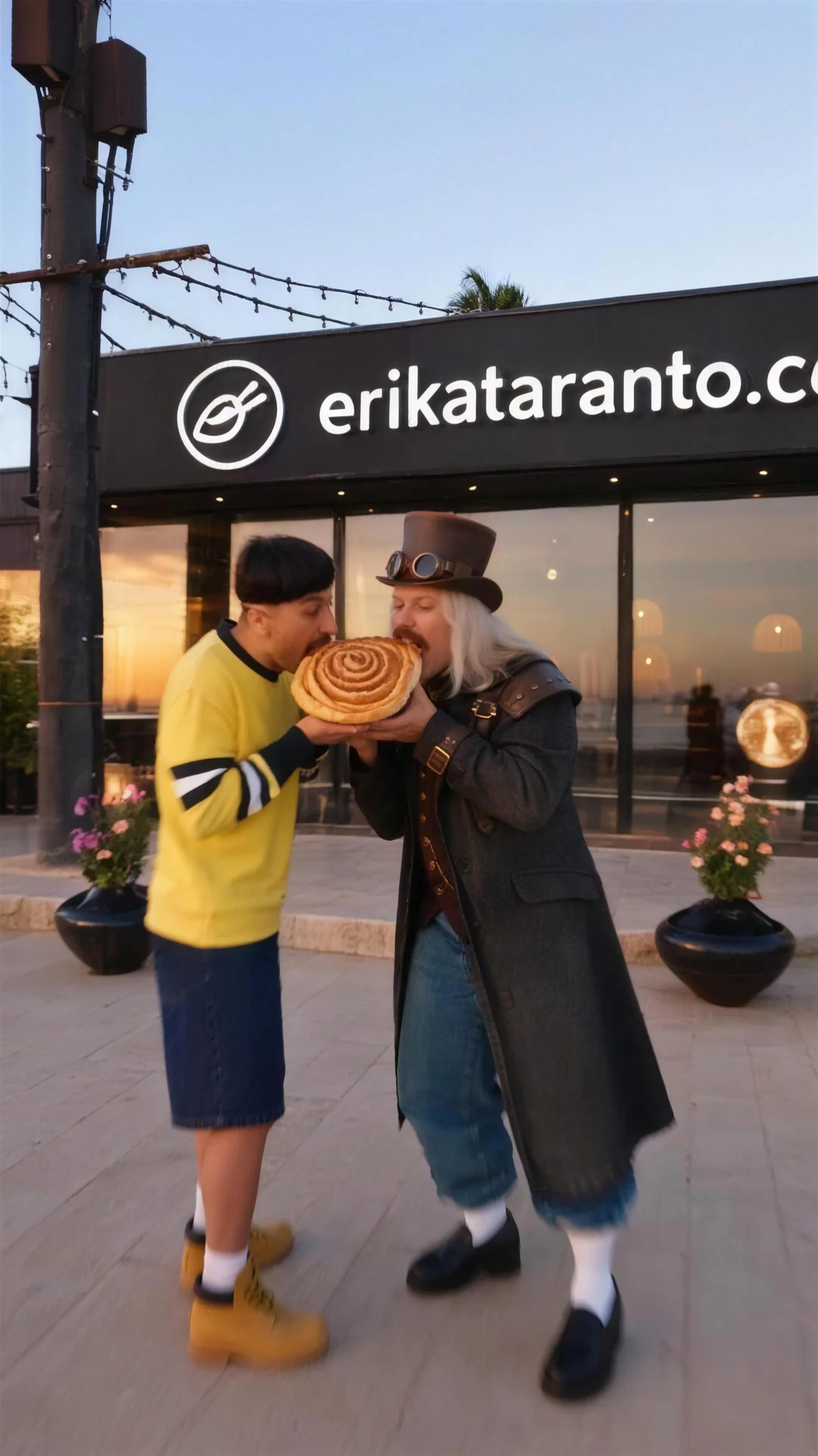
The first attempt came out with the bakery and the bread: I hadn't thought of making a reference image for the sushi. You see it in the next step.

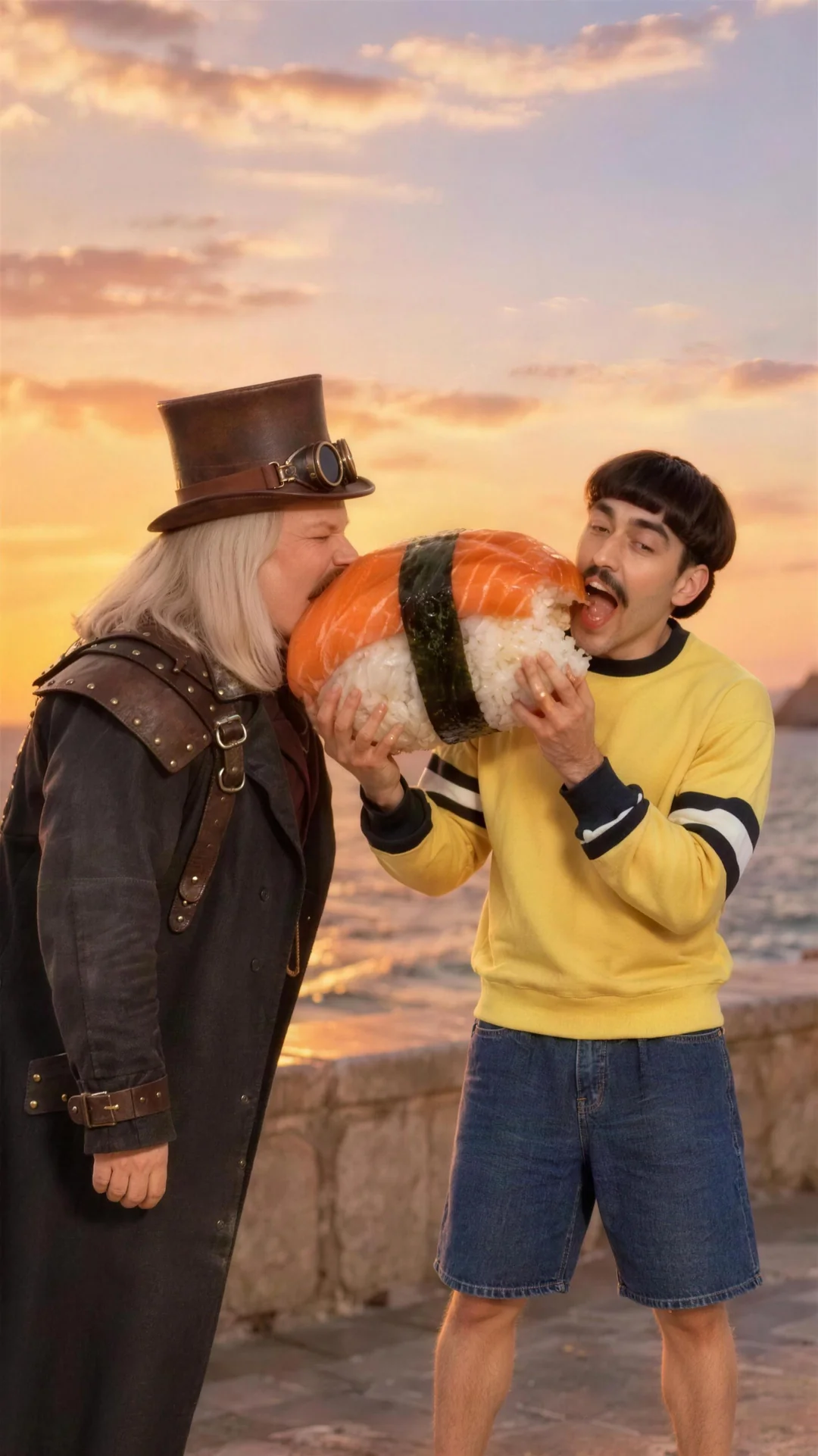
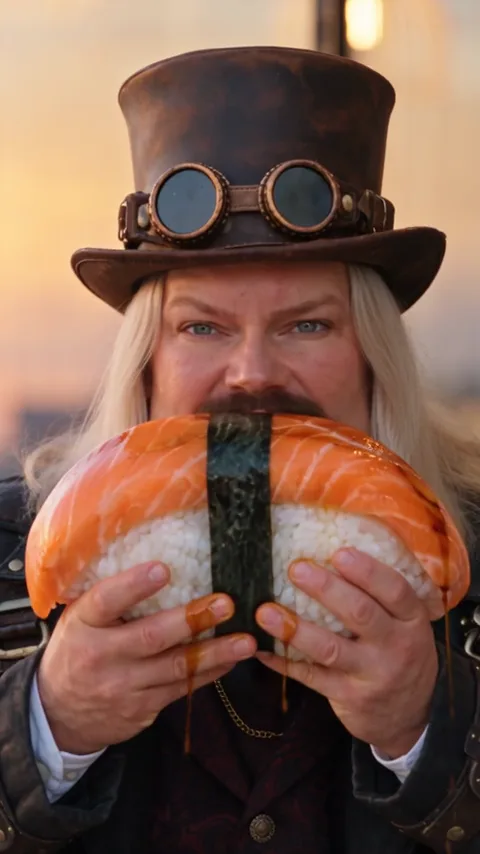
A frame of the finished video: the two men bite a giant nigiri together, at sunset on the seafront
A frame of the result
Prompt of the first attempt · Video
Motion-transfer remake of Video 1. Follow the source exactly for shot order, camera movement, timing, body movements, gestures, gaze, facial performance and interactions. Keep the source's low-angle ultra-wide handheld camera with its tilted framings. Rebuild all visible imagery as live-action footage on a seaside promenade at sunset, natural golden-hour light, unretouched skin, realistic pores and hair. CAST MAPPING IS FIXED: Image 1 is one adult man, shown in an identity sheet. Replace the original protagonist, the woman in the black halter vest and wide pink trousers who walks down the street, reacts at the stall, takes the other man by the hand, points to the bakery and leads the dance, with this man in his outfit from the sheet. Image 2 is one adult woman, shown in an identity sheet. Replace the woman in the headscarf and sunglasses who sits at the street stall selling bread with this woman in her outfit from the sheet. Image 3 is one adult man, shown in an identity sheet. Replace the man in the white t-shirt and black shorts who buys and eats the bread with this man in his outfit from the sheet. Keep their faces, hair, outfits and body proportions faithful to the sheets through every angle. Each sheet represents ONE person, not several people or a grid to display. Image 4 is the approved location. Rebuild the entire source street, including the bakery shop that the protagonist points to and dances in front of, as this exact place: the sushi restaurant with its glass front takes the place of the bakery, with the sandy beach, the stone promenade, the palm trees, the lamp posts and the buildings in the distance, under the same low golden light. The street stall with its folding table, white tablecloth, trays of bread and folding chair stands on the promenade in front of the restaurant. Map source floor contacts onto the real paving. Preserve the layout and dimensions consistently as the camera and the people move. Remove the original cars, power cables and buildings. Reconstruct the source signs and text (the bakery sign, the bank sign, the other shop signs, the phone number) as uninterrupted clean scene imagery; the only text in the scene is the sign already in Image 4. Deliver a single full-frame 9:16 live-action-looking video, stable identities, convincing hands, no studio beauty retouching, no trace of the original people. No subtitles, no music, no dialogue. Preserve the source timing and the three-person performance.
  • ModeMotion Transfer
  • Reference videofrom 4 to 30 seconds
  • Imagesthe three character sheets and the location (the background)
  • Promptthe one in the prompt box

TipTo describe an adult I write "woman" and "man" and avoid "girl", "boy" and "young". It's a precaution of mine: Higgsfield doesn't publish the list of words the filters block, but the filters are strict and I don't want to leave any doubt about the age of the characters. If a prompt is blocked the credits come back by themselves. Don't write anything that isn't in the reference video or in your images.

Step 05: Checking and redoing only the wrong pieces

Higgsfield · Genjutsu

I watch the result one frame every half second, mark the wrong pieces and regenerate only those.

Read the step

In the first attempt the characters were right, but instead of the sushi there was bread: I hadn't thought of making a reference image for the sushi, and the model kept the bread from the original video. In this step you see the first attempt and the final video.

To find and describe the mistakes there are two ways. By hand: you watch the frames, write down the second of each mistake and what should be there instead. With a very powerful paid AI: you give it the video and tell it the part you don't like (for example "at 15 seconds the man bites the bread instead of the giant sushi: rewrite the paragraph of the prompt that fixes it") and it rewrites the paragraph. If the AI isn't powerful enough, better by hand: a wrong prompt just makes you regenerate for nothing.

To fix it I created two new images: a giant nigiri and the character biting it. I added them to the references and added to the prompt a paragraph that says which is the only food allowed and explicitly bans bread and everything else.

Regenerating everything would have put the already good pieces back in play too, so I redid only the wrong ones: three segments of the reference video, with several variants, seven in all. I picked the best variant of each piece and put it back together at the cuts of the reference. The paragraph in the prompt box is the one I added to the prompt of step 4 to redo the bite: the rest of the prompt is the same.

The first attempt, with the bakery, and the final video, with the sushi
The paragraph added to the prompt · Video
THE ONLY FOOD IS THE GIANT SUSHI: Image 5 is the giant sushi, one gigantic salmon nigiri as big as a head; use only the sushi itself, not the hands holding it. Image 6 shows exactly how the man from Image 3 bites it. On the street stall the table holds only giant nigiri like Image 5 on wooden boards. The woman at the stall hands the man a giant nigiri like Image 5 and he pays. In the eating shot the man from Image 3 holds the giant nigiri from Image 5 with both hands, as big as his head and clearly visible in every frame, and bites a corner of it, exactly like in Image 6: with the same timing as each bite in the source, the rice crumbles and the soy sauce drips down his chin and his hands. No bread, no croissants, no pastry, no fruit, no small round orange balls, no cream, and no bottles, jars, tubes or sauce dispensers anywhere.
  • Pieces redone3 segments, 7 variants
  • New imagesthe giant nigiri and the character biting it

TipWatch the video one frame every half second, not just as a thumbnail: the mistakes are in the small details.

Step 06: Audio and editing

Editing

Genjutsu keeps the audio of the reference video, if it has any. I put the pieces back together at the cuts of the reference and I always check that the clip has audio.

Read the step

Genjutsu keeps the audio of the reference video, if the reference has any. Before editing, always check whether the clip you downloaded has audio.

I put the parts back together in the order of the reference, following its cuts, and I speed up or slow down each piece so the rhythm goes back to that of the trend: the model extends the clips to whole seconds.

For music: on social media it's best to pick the sound in the platform's library when you post. On a website or anywhere else you need your own music or a clear license: the music of the trend isn't mine, which is why the video on this page has no audio.

AudioEditing
  • Audiokept from the reference, if there is any
  • Editingat the cuts of the reference
  • Musicfrom the social platform's library, or licensed

Step 07: Bonus: the same video in another style

Higgsfield · Genjutsu Styles

Genjutsu redraws your video in another style (cartoon, knitted yarn...) keeping movements and shots. The transition from normal to the style is done in editing.

Read the step

Genjutsu doesn't only pass the motion to your characters. There are also Styles: you pick a look, for example 2D cartoon, anime, stop-motion felt puppets or "Knitted Yarn World" (a world of knitted yarn), and Genjutsu redraws every frame of your video in that style, keeping motion, camera and shots as you filmed them.

It accepts videos from 4 to 30 seconds. In Styles you can add reference images (your characters, a product, the clothes) and a short, optional prompt to say what must stay recognizable (hair, hat, clothes). You also choose the resolution: as always, I recommend 1080p.

As an example I took the first 4 seconds of my video, with the steampunk man walking, and ran them through the Knitted Yarn World style.

Genjutsu applies the style to the whole video, from the first frame to the last. The transition from normal to yarn that you see in the video I did myself in editing, on the two videos, one original and one in yarn.

The same motion in two styles: a line of stitching rises from the bottom and reveals the yarn version
Style prompt · Video
Keep the man's long blond hair, brown leather top hat with goggles and long black leather coat, now made entirely of knitted yarn. Warm golden sunset light.
  • ToolGenjutsu Styles
  • StyleKnitted Yarn World
  • Videofrom 4 to 30 seconds
  • Reference imagesoptional
  • Transitiondone in editing
End of the film strip

The result

Same starting point. Another level.

Version “Wrong piece” Version “Redone piece” Wrong pieceRedone piece

Drag the slider to compare the same instant before and after the fix. The two frames are enlarged with Higgsfield's upscaler.

How do you want to continue

Do it yourself

Recreate it at home

The tools, the prompts and the steps are right above. Copy, paste, recreate.

  • Higgsfield · Genjutsu for the motionCharacters, location and video

Transparency. Affiliate link: if you sign up from here I receive a commission and you can get a discount of up to 50%, active for 3 hours from when you log in through the link (terms set by Higgsfield, they may change). I use Higgsfield every day and I would recommend it anyway.

Have me do it

Would you rather I do it?

A video like this for your brand? I'll make it: from idea to delivery, with the same care you've just seen.

  • Free quote
  • Reply within 48 hours
  • From idea to delivery
Frequently asked questions

Before you start.

Can't find the answer? Write to me: I usually reply within 48 hours.

Write to me
Can I use someone else's video as a reference?

For the motion I used a reel I found on social media, and I'm not showing it here. If you publish the result, the reference becomes a question of rights: the safest route is to shoot a reference video yourself, even just ten seconds with your phone.

How many people can I put in the video?

As many as there are in the reference video: Genjutsu transforms whoever is there, it doesn't add anyone. A prompt with four characters only works if the reference has four people.

Why is the video in two parts?

Genjutsu accepts references from 4 to 30 seconds. Mine was longer, so I split it in two parts at the cuts and put them back together.

Does the video have audio?

Genjutsu keeps the audio of the reference video, if it has any. The video on this page has no audio because the music of the trend isn't mine.

What if I want a video like this for my brand?

Then I'll make it: write to me from the Contact page and we'll talk.

The next case study? Yours.

An ad, a mini-film or an AI character: we bring to your brand the same care you have just seen. First call and quote, free.